Valence 1.1.0 - Conversation Explorer
A brand-new way to browse and organize every conversation.
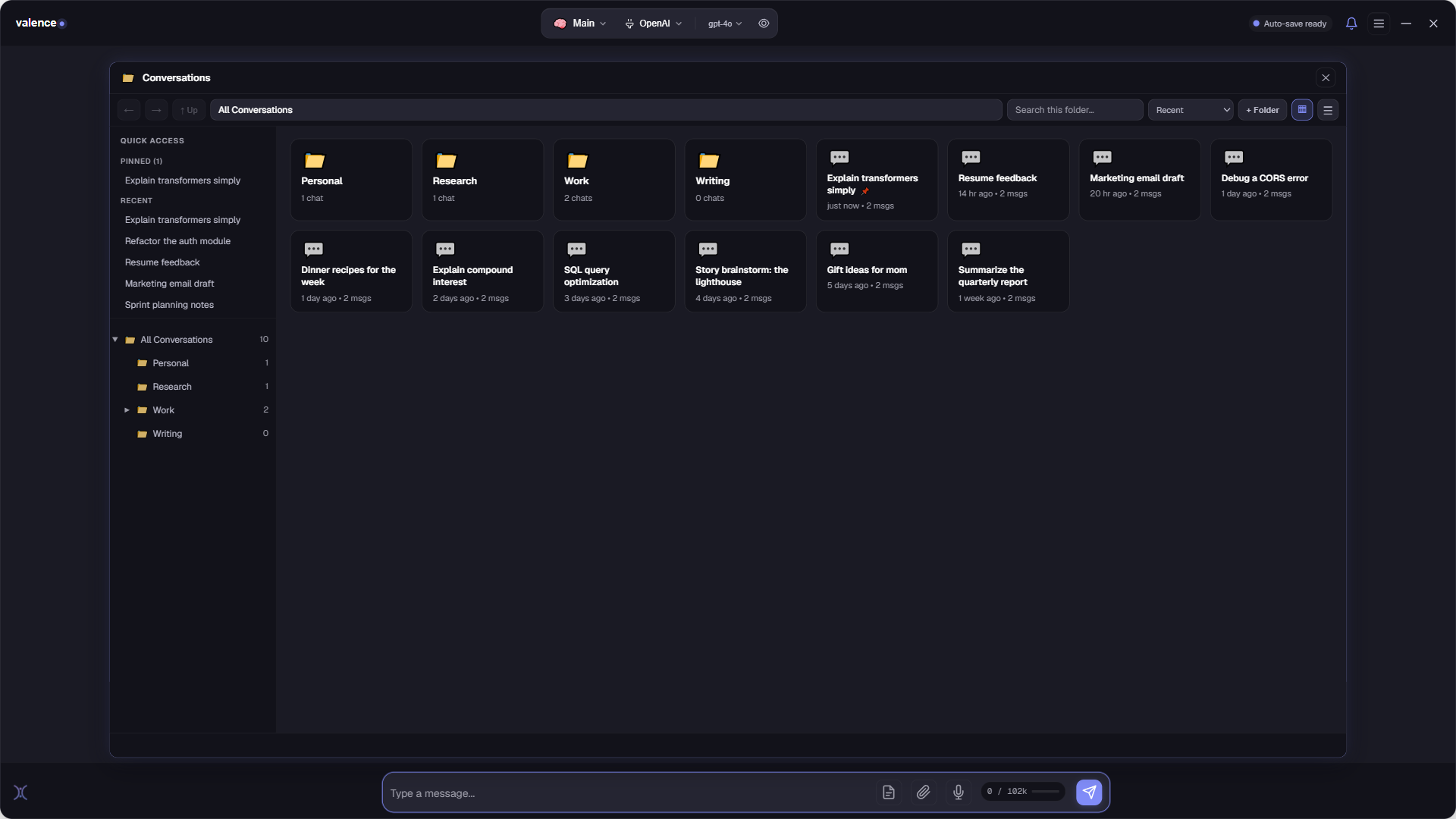
What’s new
- Conversation Explorer. Real, nestable folders replace the old side list, with Quick Access for your pinned and recent chats. The folders live as real folders on your disk, so your organization makes sense outside the app too.
- Grid and table views. A spacious card grid, or a sortable table showing tags, last-modified, message count, and which AI model answered.
- Peek before you open. Read a full conversation in a side panel without leaving the explorer.
- Your own tags. Add tags to any conversation and sort by them.
- Move and organize. Drag a chat into a folder or use the actions menu to move, rename, pin, or see details at a glance.
- Know who answered. Each AI reply now shows the model that produced it.
Fixes
- Conversation details and actions menus stay on-screen and correctly positioned at any window size.
Download
Valence 1.1.0 (.msi) · Windows 10/11 (64-bit) · 829 MB · 7-day free trial, then $59.95 once.
SHA-256:
22F732F95215DFDB68B4920EAF3C790B0C51A903D4B2A109A0EA3FF4C7098687Unsigned installer, SmartScreen may warn: More info → Run anyway. Existing installs upgrade in place.