Valence 1.5.1 - A guided, friendlier installer
This update is about the way Valence arrives on a PC: the installer now teaches.
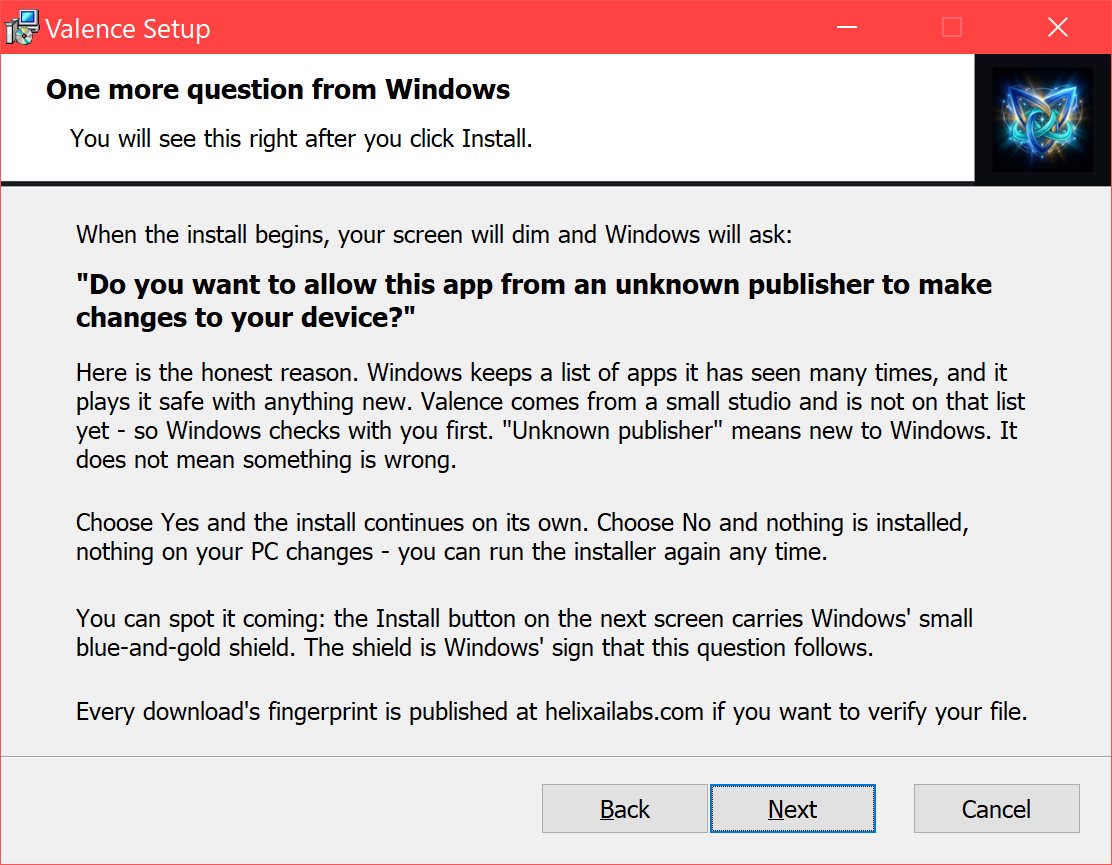
What’s new
- The installer walks you through setup. A fresh install gets a heads-up before Windows asks its “unknown publisher” question - the exact words it will use, the honest reason it appears (Valence is new to Windows’ seen-it-many-times list; it does not mean something is wrong), and exactly what Yes and No each do.
- First-launch expectations, up front. The final page tells you what to expect the first time you open Valence: the one-time Windows Defender look, the AI model download, and the firewall question about llama-server (your built-in AI engine) with the exact button to click - plus a Getting Started link and an “Open Valence now” checkbox.
- Updates stay quick. Upgrading? The wizard skips the walkthrough and finishes with a single line. You are only ever taught once, on a fresh install.
- Valence’s own mark on every wizard page, replacing the stock installer clip-art.
Download
Two installers - both ship every release:
Valence 1.5.1 - All-in-one (.msi) · 811 MB · CUDA + Vulkan bundled, fully offline.
Valence 1.5.1 - Slim (.msi) · 305 MB · your GPU pack is fetched on first run.
Windows 10/11 (64-bit) · 7-day free trial, then $59.95 once.
All-in-one SHA-256:
6F42615EA435E665D657121715BDBC00557ADD41B93BA4979D0BE3C29CA7ECF2Slim SHA-256:271AB44B1FED40CC0F56EA79DF7A918EF8E694ED53633F58E4DE24C8FB66AE7FUnsigned installer - SmartScreen may warn: More info → Run anyway. Existing installs upgrade in place - and now the installer itself tells you what each prompt means.