Valence for Android 1.5.16 alpha - A new Settings and a model library
A rebuilt Settings page, a model library that tells you what will actually run on your phone, and a round of kids safety fixes. This is still an alpha. The rough edges we know about are listed at the bottom.
What’s new
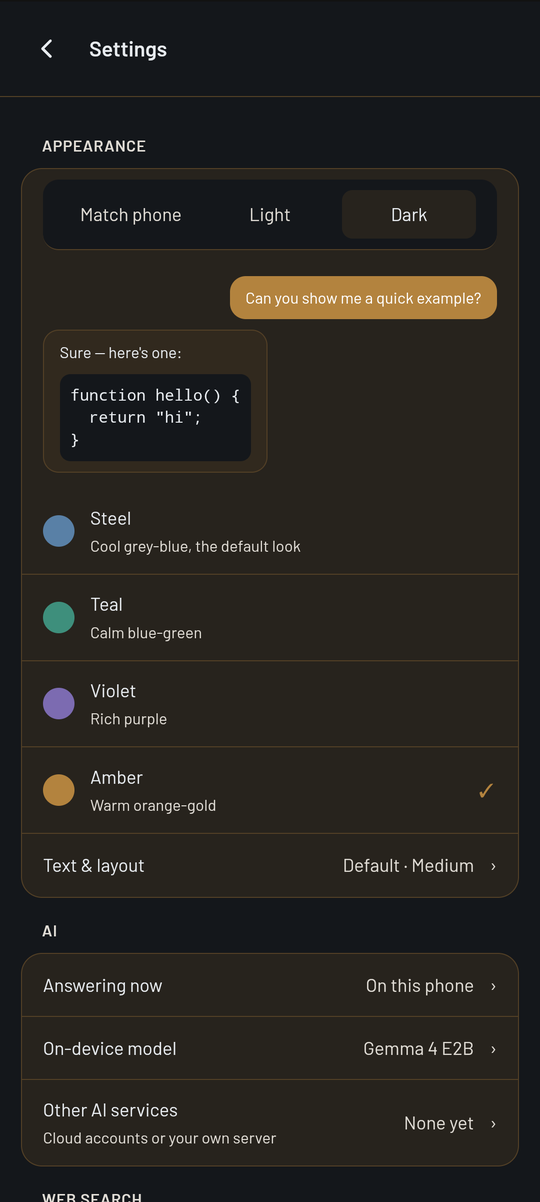
- A new Settings page. Settings is now one full-screen page instead of a pop-up with tabs. Most changes apply the moment you make them, and anything that deletes or replaces something asks first.
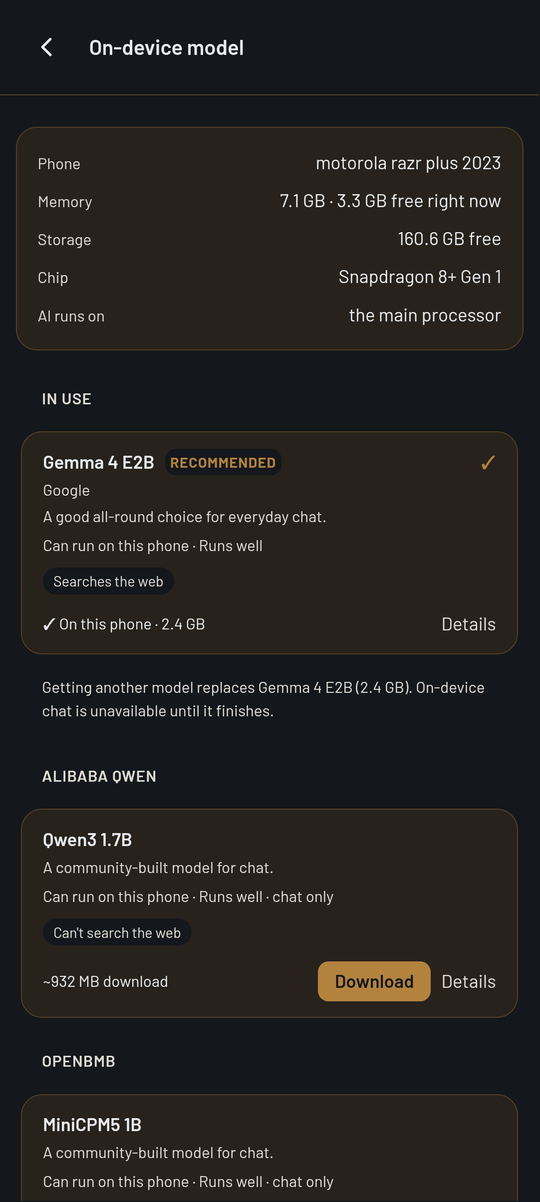
- A model library that knows your phone. It shows your phone’s memory, free storage and chip, then lists models grouped by who makes them, with the one in use pinned at the top. Each model says whether it can run on your phone and whether it runs well there. Those verdicts come from tests we ran on a real phone, a motorola razr plus 2023. On phones we haven’t tested yet, the card says so instead of guessing.
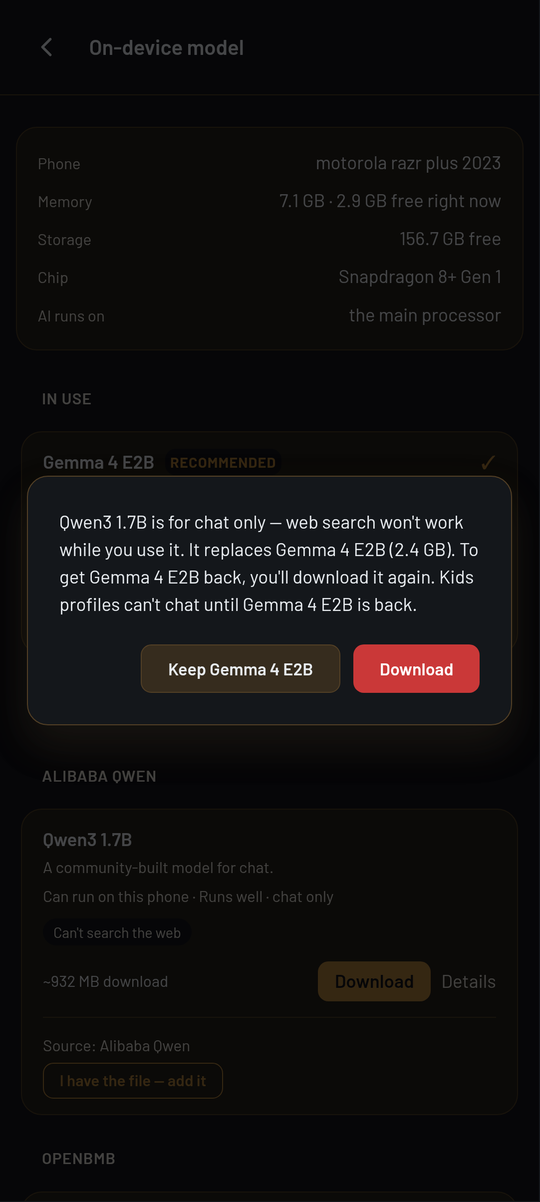
- Two experimental models you can download in the app. Qwen3 1.7B and MiniCPM5 1B are smaller alternatives to Gemma 4 E2B. They are for chat only: web search doesn’t work with them, and kids profiles can’t use them. Before downloading one, Valence tells you that, and that it replaces the model you have now. If you ask one of them something that needs a search, a line under the answer says search is off for this model.
- Downloads are checked before they’re installed. Every model you download from the library is checked against the official file’s SHA-256 fingerprint. If it doesn’t match, it isn’t installed and the model you already had stays in place.
- Thinking Off means off. The thinking level (Off, Low, Medium) now lives in the model menu at the top of the chat. Off now really is off, including on turns where Valence searches the web.
- A cleaner response window. The steps Valence takes appear above the answer, with a collapsible Thought row and a card for each web search. The answer itself is a plain bubble, and messages no longer have avatars beside them. Tap the info icon to see where it ran, how long it took and how many tokens it used.
- More consistent themes. The app’s screens now take their colours, text sizes and spacing from one shared set. Light and dark mode, in every accent colour, look like the same app. Font Size now changes the size of answers without making the buttons and menus bigger. Kids mode screens move to the shared set next.
On a motorola razr plus 2023, Gemma 4 E2B generated about 22 tokens per second. That is the median of 41 replies in our pre-release test, as reported by the on-device engine’s own benchmark counter. Your phone will differ.
Kids safety fixes
- A kids profile only chats on a model that has been approved for kids. If the model on the phone isn’t approved, the child’s message is refused rather than sent to it.
- The mood check Valence runs on a child’s messages now runs only on a kids-approved model.
- Switching to a kids profile now opens a clean chat. The adult conversation is no longer shown to the child or sent to the child’s model.
- Deleting a kids profile now needs the parental password.
Known rough edges
- Cancelling a model download shows an error message even though it was just cancelled. The model you had before is kept.
- If a download fails the checksum, the message appears briefly, but the model’s card doesn’t keep a “Try again” button. Tap Download again to retry.
- Web search can still give an out-of-date answer even when one of its sources has the newer fact. Check the sources under the answer.
- MiniCPM5 1B sometimes drops the full stop at the end of its replies.
Download
Valence-1.5.16-alpha-arm64.apk · 64-bit Android 7.0+ · 33 MB
SHA-256: CDA2C0B0BC19F75E6769350E5AB4D60E007792AB17B61BDCC858097FA1BE2165
If you have 1.5.14 or 1.5.15, this installs straight over it and keeps your chats and your downloaded model.
Found something broken? Write to help@helixailabs.com.