Valence 1.8.3 - One model at a time, and chats that save themselves
Steadier local AI, chats that save themselves, and a clearer model list.
Fixes
- Only one local model runs at a time. Switching models or profiles quickly could leave extra copies of the local AI running and use up your memory. Now there is only ever one, and the newest choice wins.
- Each profile keeps its own model. Switching profile saves your chat, closes the old model and opens the one that profile uses. Switching back brings back its model.
- A message sent mid-switch is not lost. It waits and sends when the switch finishes. Moving between a Kids profile and an adult one puts it back in the message box instead, with a note under it.
What’s new
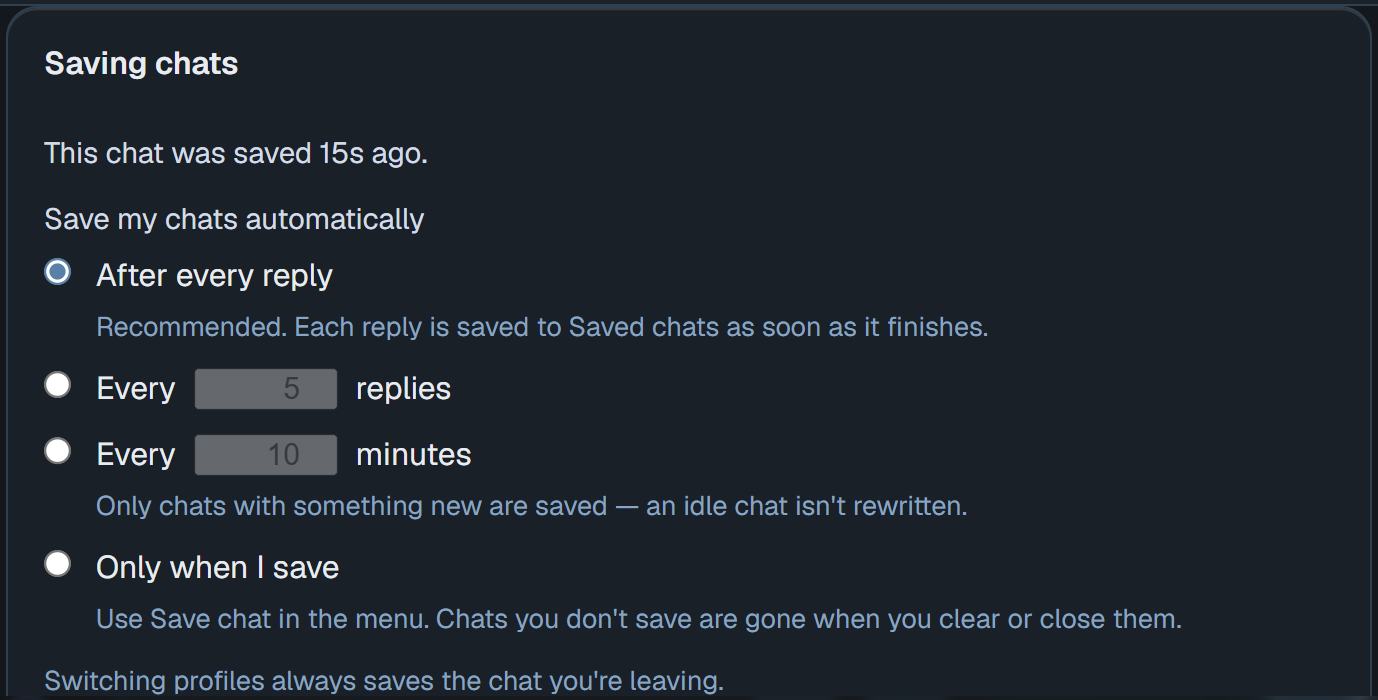
- Chats save themselves. Settings → Storage → Save chats: after every reply (the new default), every few replies, every few minutes, or only when you save. The note at the top shows when this chat was last saved — click it to change the setting.
- A clearer model list. Settings → AI Providers → Local AI has Text models and Image models at the top, with Help me pick, Ready to switch and All models beside them. Image models are listed while we test them, and never run in a Kids profile.
1.8.3 also carries everything in 1.8.2.
Download
Valence 1.8.3 — Slim (.msi) · 121 MB · your GPU pack is fetched on first run.
Valence 1.8.3 — All-in-one (.msi) · 620 MB · CUDA + Vulkan bundled, fully offline.
Windows 10/11 (64-bit) · 7-day free trial, then $24.99 for Windows, or $59.95 for every platform.
All-in-one SHA-256:
2E047533A4D0B899DC9BF5FE8D85874E89295DE6A01E6B227AE8A53C1C58AA99Slim SHA-256:3C22A184782EA8EBCF890C93DAA60D45E8C099505B50A93D0E5A93D2888D9D0DUnsigned installer — SmartScreen may warn: More info → Run anyway. Existing installs upgrade in place.